Hosting is one of the first technical decisions you make for a website, and it is easy to get wrong in both directions. Pay for too little and your site slows down or throws errors when traffic grows. Pay for too much and you spend months funding capacity you never use.
This guide compares shared vs VPS vs cloud hosting in plain language. It explains how each works, where they differ in speed, security, cost, and scalability, and how to match a plan to your site. It also covers the specifications worth checking before you buy, what to try before upgrading, and how to move to a new plan without breaking anything.
One thing to know up front: hosting terminology is not standardized. A “VPS” from one company can behave quite differently from a “VPS” at another, and “cloud hosting” is used for several different products. This guide is provider-neutral and does not quote prices or benchmarks, because they change often and vary by provider and plan. Where numbers matter, it tells you what to look for on the plan page.
Editor’s Note: How to Use This Guide
This is an educational comparison, not a ranking of specific providers. It does not claim that any hosting type is best for everyone, and it is not based on hands-on testing of individual hosting companies.
Plans differ widely, even within the same hosting type. When you evaluate any plan, compare these things directly on the provider’s website and in its terms of service:
- Resources: CPU, RAM, storage, and how each is allocated
- Limitations: process, memory, I/O, and file-count limits, plus any fair-use policies
- Renewal pricing: what you pay after the introductory term
- Backup policies: how often backups run, how long they are kept, and how restores work
- Support: channels, hours, and what is actually covered
- Upgrade options: how easily you can move to a bigger plan or a different hosting type
For current provider recommendations, see Best Web Hosting Providers.
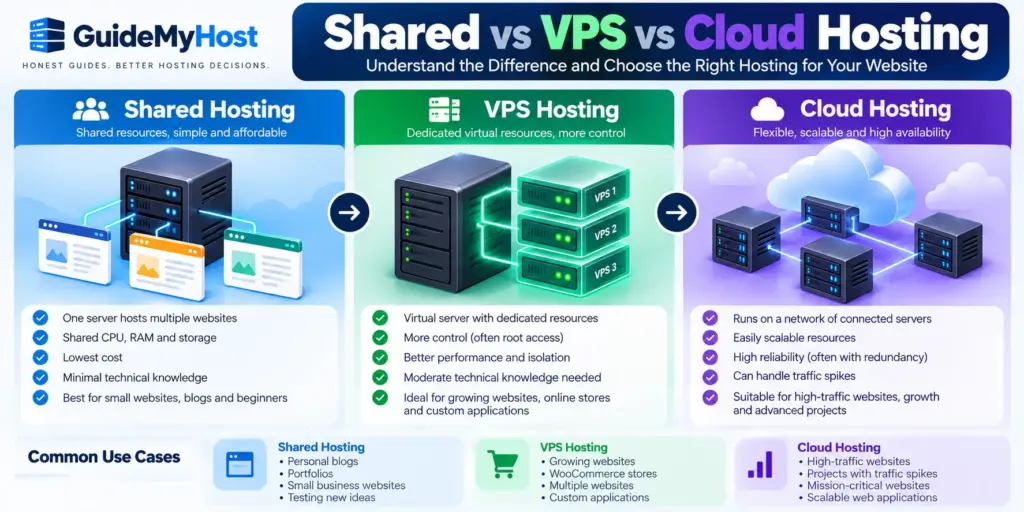
Quick Comparison: Shared vs VPS vs Cloud Hosting
| Feature | Shared | VPS | Cloud |
|---|---|---|---|
| How it works | Many sites share one server’s resources | A physical server is split into virtual servers | Runs on virtualized infrastructure, often across connected servers |
| Resource isolation | Low (account-level limits) | Medium to high | Medium to high, depending on the plan |
| Typical cost level | Usually lowest | Usually moderate | Varies widely |
| Technical skill | Minimal | Moderate, less if managed | Low to high, depending on the product |
| Server control | Very limited | Often root access | Often root access on self-managed plans |
| Scalability | Limited | Good, within plan or server limits | Typically strongest |
| Reliability design | Single server | Often a single physical host | Often includes redundancy, varies by provider |
| Often suits | New sites, small blogs | Growing sites, stores, custom software | Variable traffic, high-availability needs |
The short version:
- Shared hosting is typically the simplest and cheapest way to get a site online.
- VPS hosting usually offers more isolation, more control, and more predictable resources, at a higher price.
- Cloud hosting is usually built for flexibility and resilience, though the term covers several different products.
The right choice depends on your traffic, budget, technical comfort, and tolerance for downtime.
What Is Shared Hosting?
Shared hosting means your website runs on a server that also hosts other customers’ websites. Everyone draws from the same underlying hardware: CPU, memory, disk, and network connection.
Think of an apartment building. Each tenant has a separate unit, but the building’s plumbing and electricity are shared. If one tenant uses far more than their share, others can feel it, although a well-managed building has rules to limit that.
How shared hosting works
The provider installs and manages the operating system, web server software, PHP, database software, and a control panel such as cPanel or a custom dashboard. Your account sits inside that environment with its own files, database, and email, but not its own server.
Providers keep accounts from overwhelming each other with account-level limits. Depending on the host, these can include:
- CPU limits: a cap on processor time or usage per account
- Memory (RAM) limits: a cap on how much memory your processes can use
- Process limits: how many processes or PHP workers can run at once
- I/O limits: how fast and how much your account can read from and write to disk
- Inode limits: the number of files and folders your account can hold
- Database limits: connections, database size, or query activity
Many plans advertise “unlimited” storage or bandwidth. That usually comes with fair-use terms and with the limits above, so read the terms of service rather than the headline.
The number of accounts on a server varies by provider and plan, and providers rarely publish it. The practical question is not how many neighbors you have, but how the host limits and monitors them.
What you control and what you don’t
You manage your website files, databases, email accounts, domains, and installed applications. You do not control the server itself. You generally can’t:
- Install custom server software
- Change core web server or PHP-level settings beyond what the panel offers
- Run long-lived background services
- Access the server as an administrator
For many websites that is a benefit, because there is nothing to maintain.
Who shared hosting often suits
- Personal blogs and portfolios
- Small brochure sites for local businesses
- Early-stage websites with modest, mostly cacheable traffic
- Beginners who want a simple setup
- Anyone testing an idea before investing more
Limitations to understand.
- Performance can fluctuate when the server is busy, depending on how well the provider manages it.
- Resource caps apply per account, and exceeding them can slow or suspend a site.
- Customization is limited to what the provider allows.
- Isolation is weaker than on a VPS. Reputable hosts add account-level protections, but you are still sharing a system.
What Is VPS Hosting?
VPS stands for Virtual Private Server. A provider uses virtualization software to divide a physical server into several virtual machines. Each VPS runs its own operating system and has its own allocation of CPU, RAM, and storage.
Using the building analogy again, a VPS is closer to a condo or townhouse. The structure is shared, but your walls are solid, your utilities are separately allocated, and you can change what is inside your unit.
Virtualized vs guaranteed resources
“Virtualized” does not automatically mean “guaranteed.” This is the most misunderstood point about VPS plans. Depending on the provider and plan, your resources may be:
- Dedicated or reserved: a defined amount of CPU or RAM is set aside for your VPS.
- Share-based: you get a proportion of CPU time relative to other VPS accounts on the same host, so performance depends partly on what neighbors are doing.
- Burstable: you have a baseline allocation and can temporarily use more when spare capacity exists, but that extra is not guaranteed.
- Oversold (overcommitted): the provider allocates more virtual resources in total than the physical machine can deliver at once, betting that not everyone uses everything simultaneously. This is common in the industry and not necessarily a problem, but it affects consistency under load.
Many VPS plans still behave more predictably than shared hosting because the boundaries between virtual servers are firmer. But two VPS plans with the same advertised vCPU and RAM can perform differently. Before you buy, check how the provider describes CPU allocation. Look for terms like “dedicated vCPU,” “shared CPU,” or “burstable,” and for any published fair-use or CPU credit rules.
How VPS hosting works in practice
A hypervisor such as KVM, or container-based virtualization, separates each virtual server. Most VPS plans, though not all, give you root or administrator access, so you can install software, adjust server configuration, and run services shared hosting wouldn’t allow.
Managed vs unmanaged VPS
This distinction matters a great deal for beginners:
| Managed VPS | Unmanaged VPS | |
|---|---|---|
| Setup and maintenance | Provider | You |
| Security updates | Often provider-handled | Your responsibility |
| Skill needed | Low to moderate | High |
| Cost | Typically higher | Typically lower |
| Control | Sometimes restricted | Typically full |
What “managed” includes varies. Some providers handle only the operating system, while others also handle the control panel, backups, and monitoring. Check the exact scope.
Who VPS hosting often suits
- Websites that have outgrown shared hosting limits
- WooCommerce and other dynamic stores
- Sites with steady or moderately high traffic
- Developers who need custom software, specific PHP versions, or background processes
- Businesses that want more predictable performance
What Is Cloud Hosting?
Cloud hosting is the least precise term of the three. At its core, it means your website or application runs on virtualized infrastructure that can be provisioned and adjusted through software, rather than on a single fixed server you rent outright. Beyond that, providers use the phrase for different things.
What “cloud hosting” can mean
| Product type | What it usually means | Who usually manages the server |
|---|---|---|
| Cloud VPS or cloud instance | A virtual server on cloud infrastructure, billed hourly or monthly, resizable | Often you |
| Managed cloud hosting | A provider runs cloud infrastructure and handles setup, updates, and monitoring | Provider |
| Scalable cloud infrastructure | A larger setup with load balancers, separate database servers, and storage services | You or a team |
| Auto-scaling platforms | Resources increase or decrease automatically with demand | Depends on setup |
Some “cloud” plans are fixed-price products that look much like a VPS. Others are usage-billed services where you assemble components yourself. They share a name, not necessarily an architecture.
Why the term is used so differently
There is no industry standard for what qualifies as “cloud hosting,” so it is partly a marketing label. A provider might use it for:
- A VPS whose storage is network-attached and replicated
- A hosting plan backed by a cluster of servers with failover
- A single virtual server that can be resized quickly
- A full platform where traffic is spread across multiple servers
A cloud plan does not automatically mean your site runs across multiple servers at once. That depends on how the plan and your application are set up. A basic cloud server can still be a single point of failure if nothing is configured for redundancy.
Compare architecture, not the label
When a plan says “cloud,” look past the word and check:
- Are CPU and RAM dedicated, shared, or burstable?
- Is storage replicated, and is it local or network-attached?
- Does the plan automatically recover if the underlying hardware fails?
- Can you resize without migrating, and does it require downtime?
- Does it support load balancing across multiple servers, and is that included or extra?
- How is it billed: fixed monthly, hourly, or by usage?
- What does support cover on this specific plan?
Who cloud hosting often suits
- Sites with unpredictable or spiky traffic
- Online businesses that cannot tolerate much downtime
- Growing web apps and SaaS products
- Teams that want to change capacity without migrating servers
Shared vs VPS vs Cloud Hosting: Key Differences
| Factor | Shared | VPS | Cloud |
|---|---|---|---|
| Structure | One server, many accounts | One physical host, many virtual servers | Virtualized infrastructure, sometimes multi-server |
| Resources | Shared, with account limits | Allocated, sometimes guaranteed | Flexible, often scalable |
| Isolation | Account-level | Virtual machine level | Virtual machine level or higher |
| Control | Control panel | Often root access | Varies by product |
| Maintenance | Provider | You or provider (managed) | You or provider (managed) |
| Hardware failure | Can affect all accounts on that server | Can affect VPS on that host | Often reduced by redundancy, if configured |
| Billing | Subscription | Subscription | Subscription or usage-based |
Shared hosting vs VPS hosting
The core difference is isolation and resource predictability. On shared hosting, you operate within account limits on a common environment. On a VPS, you get a defined virtual server, and, depending on the plan, reserved resources and server-level control.
VPS vs cloud hosting
A traditional VPS runs on one physical host. Cloud infrastructure typically spreads workloads across a pool of hardware and often adds faster resizing and better recovery from hardware faults. A VPS is often simpler and more predictable in price. Because many “cloud VPS” products blend both models, compare plan details, not names.
Shared vs cloud hosting
Shared hosting is a low-cost, fixed, hands-off environment. Cloud hosting can offer more flexibility and resilience, usually at higher or less predictable cost. For a small site with steady, low traffic, the extra capability of a cloud plan may not produce a difference you can notice.
What Hosting Specifications Should You Compare?
Plan pages are full of numbers and labels. These are the specifications that matter, explained in plain terms. This section applies to all three hosting types.
| Specification | What it means | Why it matters | What to check |
|---|---|---|---|
| CPU / vCPU | Processing power for running PHP, databases, and requests | Slow CPU means slow dynamic pages | Dedicated, shared, or burstable? |
| RAM | Memory for running processes | Too little causes slowdowns and crashes | Guaranteed or capped? |
| Storage type | SSD or NVMe drives | NVMe is typically faster than standard SSD for disk-heavy tasks | Type, and whether it’s local or network-based |
| Storage capacity | Total disk space | Includes site files, databases, emails, backups | What counts toward the quota |
| Bandwidth | Data transferred to visitors | Heavy media or downloads use it fast | Cap, throttling, or fair-use terms |
| PHP workers | How many PHP requests can run at once | Limits simultaneous dynamic page loads | Number per site or account |
| CPU limits | Caps on processor usage | Exceeding them can cause throttling | How limits are measured and enforced |
| RAM limits | Caps on memory use | Hitting them can cause errors | Per account, per process, or per VPS |
| I/O limits | Caps on disk read/write speed | Affects databases and backups | Whether limits are published |
| Inodes | Number of files and folders allowed | Email, caches, and backups use many files | The inode cap |
| Database limits | Size, connections, and activity limits | Busy sites can hit connection caps | Limits per database or account |
| Backup frequency | How often backups run | Defines how much data you could lose | Daily, weekly, or on demand |
| Backup retention | How long backups are kept | Affects your ability to roll back later | Number of restore points, and any fees |
| Data center locations | Where the server is physically located | Closer to visitors typically means lower latency | Locations available, and whether you can choose |
| CDN | Network that serves static files from nearby locations | Can reduce load and improve speed globally | Included, optional, or separate service |
| Control panel | The management interface | Affects how easy day-to-day tasks are | Which panel, and whether it costs extra |
| Managed vs unmanaged | Who handles server administration | Decides your workload and risk | Exact scope of management |
| SSL | Encryption certificate for HTTPS | Required for trust and many features | Free or paid, and auto-renewal |
| Support | Help channels and expertise | Decides how fast problems get fixed | Hours, channels, and what’s covered |
| Renewal pricing | What you pay after the first term | Often differs sharply from the intro price | Renewal rate and billing term |
Specifications people often misread
- “Unlimited” is not unlimited. Fair-use policies and technical limits still apply.
- Matching vCPU and RAM numbers don’t guarantee matching performance. Allocation method, hardware, and overselling differ.
- Storage size isn’t storage speed. A smaller NVMe drive can outperform a larger, slower one for database-heavy sites.
- PHP workers matter more than visitor counts for dynamic sites. If all workers are busy, extra requests wait in a queue.
- Backups on the same server as your site are not enough. Keep a copy elsewhere.
Performance and Speed Comparison
Is VPS faster than shared hosting?
Often more consistent, but not automatically faster. Because VPS resources are allocated to you, performance usually varies less when other customers get busy. Whether it’s faster depends on the plan’s resources, how CPU is allocated, and how the site is configured. A well-optimized site on a good shared plan can outperform a poorly configured VPS with little RAM, no caching, and an unoptimized database.
Is cloud hosting faster than VPS?
Not necessarily. Cloud infrastructure can scale and recover more easily, but speed still depends on allocated CPU and memory, storage type, network quality, and data center location. A well-specified VPS can match or beat a modest cloud plan. Cloud’s typical advantage is the ability to maintain performance as demand grows, if capacity is added or auto-scaling is configured, rather than raw speed on a quiet day.
What really determines website speed
Hosting type is one factor among many:
- Allocated resources on your actual plan
- Provider infrastructure: hardware quality, network, and how heavily servers are loaded
- Data center location relative to your visitors
- Caching: page, object, and browser caching
- CDN usage for images, scripts, and stylesheets
- Website optimization: image sizes, theme and plugin quality, database health
- Software versions: supported PHP versions, HTTP/2 or HTTP/3, modern web server software
- Workload type: a static blog and a busy store stress servers very differently
| Performance factor | Shared | VPS | Cloud |
|---|---|---|---|
| Consistency under load | Can fluctuate | Often steadier | Often steady, depends on setup |
| Impact of other users | Possible | Depends on allocation | Depends on allocation |
| Tuning options | Limited | Extensive | Extensive |
| Traffic spikes | Limited by account caps | Limited by VPS size | Better if scaling is enabled |
| Dependence on optimization | High | High | High |
Pricing and Cost Comparison
This guide does not quote prices because they change frequently and differ by provider, term length, and promotion. What stays stable is how costs are structured.
Shared hosting cost
Shared hosting typically has the lowest entry price. Costs are usually simple: a subscription fee, plus optional extras such as backups, premium support, or email upgrades.
VPS hosting cost
VPS plans typically cost more than shared plans because you get allocated resources and server access. Managed VPS usually costs more again, since you are also paying for administration. Unmanaged plans are cheaper on paper but cost you time or a freelancer’s fee.
Cloud hosting cost
Cloud pricing is the most varied. Some plans are fixed monthly products priced like VPS plans. Others are billed by usage, which can work out cheaper for light or irregular workloads and costlier for sustained heavy use. Bandwidth, storage, snapshots, load balancers, and managed services may be billed separately.
VPS vs cloud hosting cost
There is no reliable rule. A fixed-price cloud VPS may cost about the same as a traditional VPS. A multi-component cloud setup with load balancing and managed databases will usually cost more. Compare what is actually included, not the hosting category.
| Cost aspect | Shared | VPS | Cloud |
|---|---|---|---|
| Entry cost | Typically lowest | Typically moderate | Varies widely |
| Pricing model | Fixed subscription | Fixed subscription | Fixed or usage-based |
| Predictability | High | High | Moderate to high |
| Renewal changes | Common | Possible | Possible on fixed plans |
| Extras to check | Backups, email, SSL | Management, panel, backups | Bandwidth, storage, snapshots, support |
| Time cost | Low | Higher if unmanaged | Higher if self-managed |
The advertised price isn’t always the real cost
The headline monthly price rarely tells the whole story. Before you commit, check:
- Introductory vs renewal price. Promotional rates often apply only to the first term. The renewal rate can be noticeably higher.
- Monthly vs annual billing. Longer terms often lower the monthly rate but require a larger upfront payment, and a refund policy may not cover the whole term.
- Managed service fees. “Managed” can be an add-on, not a default.
- Control panel fees. Panels such as cPanel are sometimes licensed separately on VPS and cloud plans.
- Backup fees. Some providers include backups, and others charge for automated backups or restores.
- Storage fees. Extra disk space or snapshots may be billed on top of the base plan.
- Bandwidth fees. Some plans bill for transfer beyond an included amount.
- Support fees. Priority or expert support may cost extra.
- Migration fees. Some providers migrate sites free, others charge per site or per hour.
- Your own time. An unmanaged server saves money only if you can administer it efficiently.
A simple method: add the price of the plan, the extras you actually need, and the renewal rate, then compare that total across providers. Web Hosting Pricing Guide for more on how hosting is priced.
Security Comparison
Hosting type alone does not determine website security. The hosting environment, how it is managed, and how your website is maintained all matter. A well-maintained shared site can be safer than a neglected VPS.
Provider-managed vs customer-managed security
Security is split between two parties:
- Provider-managed: the data center, hardware, network, hypervisor, and, on managed plans, the operating system, patching, and monitoring.
- Customer-managed: your website application (WordPress, plugins, themes), user accounts, passwords, and, on unmanaged plans, the server itself, including firewall rules and updates.
The more control you have, the more security work moves to you.
| Security aspect | Shared | VPS | Cloud |
|---|---|---|---|
| Isolation | Account-level | Virtual machine level | Virtual machine level or higher |
| Server patching | Provider | You or provider (managed) | You or provider (managed) |
| Firewall control | Mostly provider | Often configurable | Often configurable |
| SSH access | Sometimes limited or unavailable | Typically available | Typically available on self-managed plans |
| Backups | Provider-dependent | Flexible | Often flexible, with snapshots |
| Account isolation | Provider enforced | Strong between VPS instances | Strong between instances |
| Application security | Your responsibility | Your responsibility | Your responsibility |
| Main risk | Weaker isolation, limited control | Misconfiguration, missed updates | Misconfiguration, access management |
Is VPS more secure than shared hosting?
VPS hosting generally offers stronger isolation, because another customer’s compromised site is less likely to reach yours. You can also configure firewalls and access rules. But on an unmanaged VPS, patching, hardening, and monitoring are your job. A neglected VPS can be riskier than a well-managed shared environment.
Is cloud hosting more secure?
Cloud platforms often provide strong infrastructure security, private networking, firewalls, and snapshots. Security still depends on the provider and your configuration. Misconfigured access rules, exposed services, and weak credentials are common causes of cloud breaches.
Security practices that matter on any plan
- Keep WordPress core, themes, and plugins updated
- Use strong, unique passwords and two-factor authentication
- Use HTTPS with a valid SSL certificate
- Keep backups stored away from the server
- Use a web application firewall or reputable security plugin
- Limit admin access and remove unused accounts
- Monitor logins and file changes
Outdated plugins and weak passwords cause far more website compromises than the hosting category does.
Scalability Comparison
Scalability is how easily your hosting can grow with your traffic and workload.
- Shared hosting usually scales by moving to a larger plan. Beyond that, you typically migrate to a different type.
- VPS hosting can often be resized, sometimes with a reboot or short downtime, until you reach the plan or host limit.
- Cloud hosting is typically designed for scaling. Many providers let you add resources quickly, and some support load balancing or auto-scaling.
| Scalability factor | Shared | VPS | Cloud |
|---|---|---|---|
| Upgrade path | Larger plan, then migration | Resize or migrate | Resize, add servers, or auto-scale |
| Speed of scaling | Often manual | Moderate | Often fast |
| Bigger server (vertical) | Limited | Usually yes | Usually yes |
| More servers (horizontal) | No | Difficult | Often supported, may need configuration |
| Sudden spikes | Limited by caps | Limited by VPS size | Better if configured |
| Downtime when scaling | Possible | Sometimes | Often minimal |
Scalability only helps if your site can use it. A WordPress site with slow database queries will not become fast simply by adding servers. Spreading traffic across multiple servers also requires the application, database, and file storage to be set up for it. Caching and optimization come first.
Resource Allocation and Server Control
| Aspect | Shared | VPS | Cloud |
|---|---|---|---|
| CPU | Shared, limited per account | Allocated; may be dedicated, shared, or burstable | Allocated or burstable, scalable |
| RAM | Capped per account | Typically a defined amount | Typically scalable |
| Storage | Capped, shared performance | Defined allocation | Flexible, may be network-attached |
| Root access | No | Typically yes | Typically yes on self-managed plans |
| Install custom software | No | Yes | Yes |
| Choose operating system | No | Often | Often |
| Server configuration | Provider-controlled | You control | You control |
Shared hosting gives you a control panel and nothing deeper. That suits anyone who never wants to think about servers.
VPS hosting gives you the server itself. You can install Node.js, Redis, specific database versions, or custom scripts, and tune web server settings.
Cloud hosting offers similar control, with added flexibility around networking, storage, and scaling. Managed cloud products may limit low-level access in exchange for convenience.
How Much Traffic Can Each Hosting Type Handle?
There is no universal visitor limit for any hosting type. The reason is that “traffic” is not one measurement.
Visits vs concurrent users vs requests per second
These three terms are often confused:
- Visits (or sessions) count how many people came to your site over a period, such as a day or month. This is what analytics tools usually report.
- Concurrent users are how many people are on your site at the same moment. Ten thousand visits spread across a month is a very different load from ten thousand people arriving in the same hour.
- Requests per second is how many individual requests the server must handle each second. A single page view triggers many requests: the page itself, images, scripts, stylesheets, and background calls.
A site can have modest monthly visits and still struggle if many visitors arrive at once. Servers are stressed by simultaneous work, not monthly totals.
Why requirements vary so much
- Cached pages are served quickly with little work. A mostly static blog with good page caching can handle far more visitors than the same site without it.
- Dynamic pages need PHP and database work for each request, so they use far more CPU and memory.
- WooCommerce and other stores rely on carts, checkout, and account pages that can’t be cached the same way. Product searches and filters add database load.
- Logged-in users, such as members, students, shoppers, and admins, usually bypass page caching, so each visit costs more.
- Database queries from heavy plugins, large tables, or poorly written code can slow a site long before bandwidth becomes a concern.
- Image-heavy pages use bandwidth and can slow loading, though a CDN and proper image compression reduce the load.
How shared, VPS, and cloud differ for traffic
- Shared hosting often works well for small to moderate traffic when the site is mostly cached and lightweight. Trouble usually starts when many visitors trigger dynamic pages at once and the account hits CPU, memory, or process limits.
- VPS hosting can handle heavier and more dynamic work-loads, because resources are allocated to you. How much it handles depends on the plan size, how CPU is allocated, and how well the site is tuned.
- Cloud hosting is typically the most flexible for large or fluctuating traffic, because capacity can be added or traffic distributed. In practice, the ceiling is often set by configuration, budget, and application design.
| Traffic scenario | Shared | VPS | Cloud |
|---|---|---|---|
| Low, steady, mostly cached | Often comfortable | Often more than needed | Often more than needed |
| Moderate, growing | May work if optimized | Often comfortable | Often comfortable |
| Frequent spikes | Risky | Depends on size | Often best suited |
| Heavy dynamic traffic | Often constrained | Suitable if sized well | Suitable, scalable |
| Very high or unpredictable | Rarely suitable | Possible with careful setup | Often best suited |
Instead of guessing from visitor counts, watch your own data: your host’s resource graphs, error logs, slow-query reports, and analytics for peak-hour behavior.
Shared vs VPS vs Cloud Hosting for WordPress
What’s the best hosting for WordPress?
No single hosting type is best for every WordPress site. WordPress runs on PHP and a database, and every uncached page view triggers server work. That makes resources, caching, and database performance especially important. Sites with many plugins, logged-in users, or e-commerce features need more than a simple blog.
| WordPress scenario | Hosting types to consider | Why |
|---|---|---|
| New blog or portfolio | Shared | Low traffic, low cost |
| Growing content site | Upgraded shared or managed VPS | Resource limits begin to matter |
| Membership or LMS site | VPS or cloud | Logged-in users bypass caching |
| Multiple WordPress sites | VPS or cloud | Better resource control across sites |
| Traffic spikes | Cloud with scaling | Flexible capacity |
WooCommerce stores are covered in the examples below.
What to look for in WordPress hosting
- Current PHP versions with easy switching
- SSD or NVMe storage
- Built-in caching or support for caching plugins
- Free SSL
- Automated backups with simple restore
- Staging environments
- Support that understands WordPress
- Clear resource limits (PHP workers, memory, CPU)
Managed WordPress hosting is a service layer, not a separate infrastructure type. It can run on shared, VPS, or cloud infrastructure with WordPress-specific tuning, and it is worth considering if you want less maintenance.
Shared vs VPS vs Cloud Hosting for Small Businesses
What’s the best hosting for a small business?
It depends on what the site does and what an outage would cost.
- Informational website (services, contact details, a few pages): a quality shared plan is often sufficient.
- Lead generation or content marketing: shared or entry-level managed VPS, depending on traffic and speed requirements.
- Online store: managed VPS or cloud is often worth considering, because slow checkout or downtime directly costs sales.
- Booking systems, customer portals, custom apps: VPS or cloud, for control and reliability.
- Seasonal or campaign-driven traffic: cloud, for its ability to absorb spikes.
| Business type | Reasonable starting point | What would trigger a change |
|---|---|---|
| Freelancer or consultant | Shared | Consistent slowness or limit warnings |
| Local service business | Shared | Growing traffic or added features |
| Small online store | Managed VPS or cloud | Rising orders, slow checkout |
| Agency with client sites | VPS or cloud | Number of sites, uptime expectations |
| Content publisher | Managed WordPress or VPS | Traffic growth, ad revenue dependence |
Think about the cost of downtime, not only the monthly price. If your website is your main sales channel, paying more for reliability, backups, and support is usually easier to justify than for a hobby site. Small businesses rarely have an in-house sysadmin, so a managed plan with responsive support is often better value than a cheaper unmanaged server. See Best Web Hosting for Small Business.
Which Hosting Is Suitable for Beginners?
Shared hosting is typically the most beginner-friendly. Setup is simple, one-click WordPress installers are common, and the provider handles server maintenance.
Other beginner-friendly options include:
- Managed WordPress hosting if you only plan to run WordPress
- Managed VPS if you expect growth but don’t want to administer a server
- Managed cloud hosting if the provider offers a simple dashboard and handles maintenance
An unmanaged VPS or self-managed cloud server is rarely a good first choice unless you want to learn server administration. A misconfigured server can be slow, unstable, or insecure.
Whichever you pick, choose a provider with a clear upgrade path, check backup and support quality, read the renewal price and resource limits, and review your hosting once a year. For general questions, see Web Hosting FAQ.
Real-World Examples: Which Hosting Would You Choose?
These scenarios show how the decision works in practice. They are starting points, not universal rules. Your own measurements and requirements should override them.
| Scenario | Hosting type to consider | Main reason |
|---|---|---|
| Personal blog | Shared | Low cost, low maintenance |
| Local business site | Quality shared or entry managed VPS | Reliability and support |
| Growing WordPress site | Upgraded shared, managed VPS | Resource limits appearing |
| WooCommerce store | Managed VPS or cloud | Dynamic pages, checkout reliability |
| Unpredictable spikes | Cloud with scaling | Flexible capacity |
| Web app or SaaS | Cloud or VPS | Control and scalability |
1. Personal blog
Likely choice: A reputable shared plan.
Why: A blog with mostly static, cacheable pages and modest traffic rarely needs reserved resources. Shared hosting keeps cost and maintenance low.
What could change it: Regular resource-limit warnings, a growing audience that arrives in bursts, or plans to add memberships or a store. Poor performance may also come from plugins or images, so optimize before upgrading.
2. Local small-business website
Likely choice: A quality shared plan, or an entry-level managed VPS if uptime and speed matter to your lead flow.
Why: Most local business sites are small and informational. What matters most is dependable uptime, backups, and responsive support.
What could change it: Adding online booking, payments, or a customer portal. Heavy advertising campaigns that send bursts of visitors may also justify more capacity.
3. Growing WordPress website
Likely choice: Optimized shared hosting at first, then a managed VPS or a higher-tier managed WordPress plan.
Why: As plugins, content, and traffic grow, account limits on CPU, memory, and PHP workers tend to become the bottleneck. A plan with more predictable resources can help, but only after caching and database cleanup have been tried.
What could change it: If the slowdown comes from a heavy theme or bad queries, a bigger plan only partly helps. If you can’t maintain a server, a managed option is usually safer than unmanaged.
4. WooCommerce store
Likely choice: A managed VPS, a managed WooCommerce plan, or a well-specified cloud plan.
Why: Cart, checkout, and account pages are dynamic and can’t be cached like blog posts. Each shopper puts real load on PHP and the database, and downtime during peak sales directly costs revenue.
What could change it: A small store with few daily orders and good optimization may run well on a strong shared or managed WordPress plan. A store with flash sales or heavy marketing campaigns may need cloud scaling.
5. Website with unpredictable traffic spikes
Likely choice: Cloud hosting with scaling options, a CDN, and strong caching.
Why: Fixed-size plans can be overwhelmed by sudden surges. Cloud setups can often add capacity quickly, and a CDN absorbs much of the load from static content.
What could change it: If spikes are mostly cached content, a CDN plus a modest VPS may be enough. If scaling isn’t configured, a cloud plan doesn’t protect you automatically, and costs can rise under usage-based billing.
6. Web application or SaaS
Likely choice: A VPS to start, or cloud infrastructure if you need separate databases, queues, load balancing, or rapid scaling.
Why: Applications often need custom runtimes, background workers, and server-level control that shared hosting doesn’t provide. Cloud platforms add flexibility for growth and redundancy.
What could change it: Small prototypes can run well on a modest VPS. Compliance requirements, high-availability targets, or a larger team may justify more complex cloud architecture, along with the cost and operational effort that come with it.
When Should You Upgrade From Shared Hosting?
Do I need VPS hosting?
You need to upgrade when shared hosting is the bottleneck, not simply because your site is growing. Many sites run well on shared hosting for years.
Signs it’s time to upgrade
- Regular slowdowns at busy times, even after optimization
- Resource-limit warnings (CPU, memory, I/O, entry processes) in your dashboard
- 500, 503, or “resource limit reached” errors
- Throttling or suspension for exceeding limits
- A slow WordPress admin area and long save times
- Needing software or settings that shared hosting doesn’t allow
- Slow checkout or cart problems as an online store grows
- Several sites competing for the same account limits
- Security or compliance requirements that call for isolation or custom configuration
- Your host’s support telling you the account needs more resources
Try these first
Upgrading can mask problems that cheaper fixes would solve:
- Enable page and object caching
- Compress and resize images
- Remove unused plugins and heavy themes
- Clean up the database
- Add a CDN
- Move to a supported, faster PHP version
- Check for bots or abusive traffic
If these steps give you headroom, you may not need to move yet. If you still hit limits afterward, upgrading is justified.
Is VPS hosting worth it?
It can be, if you need allocated resources, more control, or more consistent performance, and you can manage a server or pay for management. For a small, low-traffic site running well on shared hosting, it is often not worth the extra cost.
Is cloud hosting worth it?
It is worth considering when scalability, availability, or flexible infrastructure are real requirements, such as unpredictable traffic, a business-critical site, or a growing application. For a low-traffic or static site, the added capability often goes unused.
| Your situation | Reasonable next step |
|---|---|
| Site is fast and stable | Stay on shared |
| Occasional slowness, unoptimized site | Optimize first |
| Limit warnings continue after optimization | Move to a larger plan or VPS |
| Revenue depends on uptime | Consider managed VPS or cloud |
| Large traffic swings | Consider cloud with scaling |
| Need custom server software | VPS or cloud |
How to Move From Shared Hosting to VPS
Migration is manageable if you plan it. The same steps apply to most moves between hosts.
Step 1: Choose the right VPS
Decide between managed and unmanaged. Match RAM, CPU, and storage to your current needs with some headroom, and check how CPU is allocated. Look at data center locations, backup options, and support level.
Step 2: Check migration support
Many providers offer free or paid migration. If you’re not technical, use it, and ask what it covers: files, databases, email, DNS, SSL.
Step 3: Back up everything
Create a full backup of your files and database, and keep a copy away from your current host. Do this even if the migration is “automatic.”
Step 4: Set up the VPS environment
On a managed VPS, the provider usually does this. On an unmanaged one, you will need to:
- Install and configure a web server, PHP, and a database
- Set up a control panel if you want one
- Configure a firewall and secure SSH access
- Install an SSL certificate
- Set up backups and monitoring
Step 5: Transfer your site
For WordPress, use a migration plugin, a manual file and database transfer, or the provider’s migration tool. Update the database details in wp-config.php if they changed. See Free WordPress Migration Guide.
Step 6: Test before switching DNS
Preview the site on the new server before pointing your domain at it, for example by editing your computer’s hosts file. Check:
- Pages, images, and links
- Forms, checkout, and logins
- Email sending
- Plugin behavior
- Page speed and error logs
Step 7: Lower DNS TTL, then switch
A day or two before the move, lower your DNS TTL so changes propagate faster. Then update your DNS records to the new server’s IP address. Keep the old hosting active until you’ve confirmed everything works.
Step 8: Plan for email
If your email runs on the old server, move the mailboxes or switch to a dedicated email service first, so you don’t lose messages.
Step 9: Monitor after launch
Watch uptime, error logs, and resource usage for the first few days. Cancel the old account only when you’re confident.
Common mistakes: forgetting email, skipping backups, switching DNS before testing, canceling the old host too early, and overlooking SSL setup.
Pros and Cons of Each Hosting Type
Shared hosting
| Pros | Cons |
|---|---|
| Typically lowest cost | Limited resources |
| Beginner-friendly | Performance can vary |
| No server management | Limited customization |
| Pre-configured setup | Weaker isolation |
| Good for starting out | Harder to handle growth or spikes |
VPS hosting
| Pros | Cons |
|---|---|
| Allocated resources | Higher cost than shared |
| Often more consistent performance | Unmanaged plans need technical skill |
| Root access and customization | Security may be your responsibility |
| Stronger isolation | Scaling may be limited by plan or host |
| Good value for growing sites | CPU allocation varies by provider |
Cloud hosting
| Pros | Cons |
|---|---|
| Flexible, often fast scaling | Costs can be less predictable |
| Often built with redundancy | Can be complex to configure |
| Can handle spikes well | The term means different things |
| Suited to critical sites | May be unnecessary for small sites |
| Usage-based billing on some plans | Misconfiguration can cause gaps |
Is cloud hosting more reliable?
Often it is designed to be. Cloud infrastructure is commonly built with redundancy and failover, so a single hardware failure is less likely to take a site offline. But cloud hosting does not guarantee zero downtime. Real-world reliability depends on the provider’s architecture, whether your plan actually uses redundancy, your configuration, and the provider’s incident response. Check the provider’s uptime commitment and what compensation applies if it is missed, and remember that an uptime guarantee does not prevent downtime.
How to Choose the Right Hosting
No hosting type is best for everyone. Work through these six questions:
1. What type of website are you running?
A simple blog, business site, online store, membership site, or web application have very different needs.
2. How much traffic do you have?
Consider both current traffic and realistic growth over the next year, including how many people arrive at the same time, not only monthly totals.
3. How dynamic is your website?
Cached pages are cheap to serve. Carts, logins, searches, and personalized content are not.
4. How much downtime can you tolerate?
A hobby site can wait for a fix. A store or booking system usually can’t.
5. How much technical knowledge do you have?
Be honest. Managed plans cost more but save time and reduce risk.
6. What is your total hosting budget?
Include renewal prices, backups, managed service fees, control panel licenses, and your own time, not only the introductory rate.
Decision table
| If this describes you | Options to consider |
|---|---|
| First blog or portfolio, low budget | Shared hosting |
| Small business brochure site | Quality shared hosting |
| Outgrown shared limits, limited technical skill | Managed VPS |
| Need root access or custom software | VPS or cloud |
| Dynamic store or membership site | Managed VPS or cloud |
| Unpredictable traffic spikes | Cloud with scaling and CDN |
| Downtime is very costly | Managed VPS or cloud with redundancy |
| Building a scalable web application | Cloud infrastructure or VPS |
Provider red flags
- Vague “unlimited” claims without fair-use details
- Unclear or unpublished resource limits
- Large renewal increases buried in fine print
- No backups, or poor restore options
- Support that is hard to reach or unhelpful
- No clear upgrade path
Frequently Asked Questions
1. Is VPS hosting faster than shared hosting?
It is often more consistent, because resources are allocated to you, but it is not automatically faster. Plan size, CPU allocation, site optimization, and provider quality all affect speed.
2. Is cloud hosting faster than VPS?
Not always. Cloud hosting typically scales and recovers more easily, but raw speed depends on allocated resources, storage type, network, and configuration.
3. Is cloud hosting the same as VPS hosting?
Not exactly, but the lines overlap. Many “cloud VPS” products are virtual servers on cloud infrastructure. Compare resource allocation, storage, failover, and billing, not the label.
4. Does a VPS always have dedicated CPU?
No. Depending on the provider and plan, CPU may be dedicated, shared, or burstable. Check how the provider describes it.
5. Is VPS more secure than shared hosting?
It generally offers stronger isolation and more configuration control. But on an unmanaged VPS, you handle updates and hardening, so actual security depends on how it’s maintained.
6. Is cloud hosting more reliable?
It is often designed with redundancy, but reliability depends on the provider’s architecture and your setup. No hosting type is immune to downtime.
7. Is shared hosting good enough for WordPress?
For small blogs and business sites, often yes, if the host offers good caching, current PHP, and adequate limits. Heavier WordPress sites may need more.
8. What does “unlimited” mean on shared hosting?
It usually means no fixed cap on that item, subject to fair-use policies and technical limits like CPU, memory, processes, and inodes. Read the terms of service.
9. Can I run multiple websites on shared hosting?
Often yes, depending on the plan. All sites share the account’s resource limits, so several busy sites can reach those limits sooner.
10. Is VPS hosting worth it for a small website?
Usually only if shared hosting is limiting speed, stability, or functionality. A small, well-optimized site running smoothly on shared hosting often doesn’t need one.
11. Is cloud hosting worth it?
It can be, if you need flexible scaling, higher availability, or a growing application. For small, stable sites, the added capability often goes unused.
12. Do I need technical skills for VPS or cloud hosting?
For unmanaged VPS and self-managed cloud servers, yes. Managed versions handle most of the server administration.
13. Is managed VPS better than unmanaged?
For beginners and small businesses, often yes, because the provider handles setup, updates, and security. Unmanaged offers lower cost and full control if you have the skills.
14. Will upgrading hosting automatically make my site faster?
No. If the bottleneck is large images, heavy plugins, or inefficient code, better hosting only partly helps. Optimize first, then upgrade if you still hit limits.
15. Do I still need a CDN on a VPS or cloud plan?
Often yes. A CDN serves static files from locations near visitors and reduces load on your server. Faster hosting doesn’t remove the benefit of geographic distribution.
16. How hard is it to upgrade later?
It depends on the provider. Moving within the same company is often easier, and many providers offer migration help. Plan for backups, testing, and DNS changes either way.
17. Can a hosting upgrade cause downtime?
It can if the migration isn’t planned. Testing on the new server, lowering DNS TTL, and keeping the old host active until you’re confident reduces the risk.
Final Conclusion
There is no single winner in the shared vs VPS vs cloud hosting debate, only a better fit for your site, budget, and skills.
- Shared hosting suits sites that are small, mostly cacheable, and fine within account limits, where simplicity and low cost matter most.
- VPS hosting suits sites that have outgrown those limits or need more control and more predictable resources, ideally managed if you don’t want to administer a server.
- Cloud hosting suits sites and applications where scalability, availability, or fluctuating demand are real requirements, as long as you check what “cloud” actually means for the plan.
The sensible approach for most people is to choose for today’s needs, optimize before upgrading, watch your own performance data, and move up when real signals tell you to. Pick a provider with honest resource limits, clear renewal pricing, solid backups, reliable support, and an upgrade path that doesn’t force a painful migration.
To shortlist options, see Best Web Hosting Providers for small business, and review How to Choose a Web Host.
[…] Shared vs VPS vs Cloud Hosting: 2026 Comparison Guide […]