Best Web Hosting FAQ: The Ultimate Guide
If you’ve ever typed “web hosting” into Google, you already know the problem. Everyone claims to have the “best” hosting, but almost nobody explains it in plain English. This web hosting FAQ collects the questions people actually search for and answers each one clearly, with no jargon and no upsell.
Whether you’re launching your first site or troubleshooting an existing one, this web hosting FAQ is built to be the only reference page you need. Bookmark it, and check our hosting plans 2026 if you’re ready to get started.
What Is Web Hosting?
Web hosting is a service that stores your website’s files on a server and makes them accessible over the internet. When someone types your domain name into a browser, the request travels to your host’s server, which sends back the files needed to display your site. Without hosting, your website simply has no home. It’s just files sitting on a hard drive that nobody else can reach.
How Does Web Hosting Actually Work?
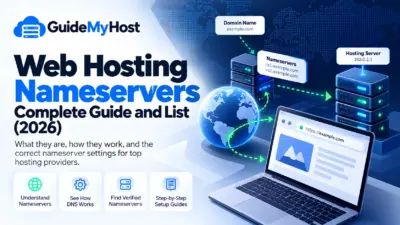
Every website needs two things working together: a domain name (the human-readable address, like yoursite.com) and hosting (the server space where the actual files live). A domain name is really just an easier-to-remember stand-in for your server’s numeric IP address. Nobody wants to memorize a string of numbers to visit a website, so the domain system translates the name into that address behind the scenes.
Do I Need a Domain Name and Hosting Separately?
Not necessarily as two separate purchases, but they are two separate services even when bought as a bundle. Many hosting companies sell both together for convenience. Still, you can register a domain with one company and host your site with a completely different one. You just point the domain’s nameservers at your hosting provider.
Web Hosting FAQ: What Are the Different Types of Web Hosting?
This is one of the most-searched hosting questions, and for good reason. Picking the wrong type can cost you money or performance. There are four main categories.
Shared Hosting.
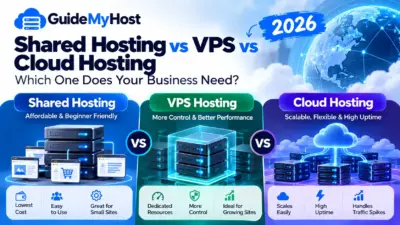
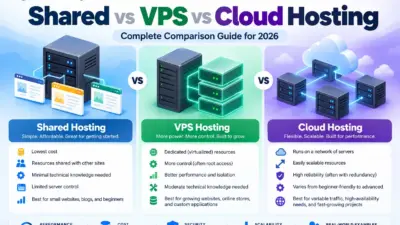
- Your site sits on a server alongside dozens, hundreds, or even thousands of other websites, all sharing the same CPU, RAM, and storage pool. It’s the cheapest option and the most common starting point for new websites, though performance can dip since resources are split among everyone on the server.
VPS (Virtual Private Server) Hosting.
- A VPS is a hybrid between shared and dedicated hosting. A physical server hosts several virtual instances, each given its own slice of that server’s hardware resources and functioning as an independent server. You get more consistent performance and better isolation than shared hosting, at a mid-range price.
Web Hosting Pricing 2026
Dedicated Hosting.
- With dedicated hosting, an entire server is allotted to your website or group of websites. You get the whole infrastructure to yourself rather than sharing it. It’s the most powerful and secure option, but also the most expensive, and it typically requires someone with server administration skills to manage it.
Cloud Hosting.
- Instead of living on a single physical machine, cloud hosting draws resources from a network of interconnected servers acting as one system, so your site isn’t dependent on any one piece of hardware. It’s built for scalability and is often compared directly against VPS and dedicated hosting when businesses need flexible, on-demand resources.
Shared vs. VPS vs. Dedicated vs. Cloud: Which One Should I Choose?
There’s no single “best” answer. It depends on your traffic, budget, and technical comfort level. As a rule of thumb:
- Light, informational site or first-time blog: shared hosting is usually enough to start.
- Growing site with steady traffic, bookings, or ad campaigns: VPS or cloud hosting gives you breathing room without a big jump in complexity.
- High-traffic, mission-critical, or security-sensitive site: dedicated hosting gives you full control, though at the highest cost.
- Unpredictable traffic spikes (promotions, viral posts, seasonal demand): cloud hosting tends to handle bursts most gracefully since resources scale on demand.
One thing worth knowing before you compare plans: some providers market a VPS running on cloud infrastructure simply as “cloud hosting.” It’s worth asking exactly what CPU and RAM are reserved for you, whether storage is SSD/NVMe, and what backup policy is included.
How Much Does Web Hosting Cost?
- Cost varies dramatically by hosting type. Shared plans are the cheapest, cloud and VPS sit in the middle, and dedicated servers are the priciest since you’re paying for exclusive hardware. Be cautious of unusually cheap “unlimited” plans. The fine print (shared resources, add-on fees for backups or SSL, renewal price increases) matters more than the advertised sticker price.
What Is Uptime, and Why Does It Matter?
- Uptime is the percentage of time your website stays online and accessible. Most reputable hosts advertise 99.9% uptime or better. Anything meaningfully below that means more frequent outages, lost visitors, and potential revenue loss for business sites. Independent monitors like UptimeRobot or Pingdom can verify a host’s real-world uptime rather than relying on marketing claims alone. When comparing hosts, look for an uptime guarantee backed by a service-level agreement, not just a number on a page. Check out our uptime comparison of top hosts for real numbers.
What Is an SSL Certificate, and Do I Need One?
- An SSL certificate encrypts the data moving between your visitor’s browser and your server, which is why secure sites show “https://” and a padlock icon instead of a plain “http://”. Beyond security, SSL is now effectively mandatory. Browsers flag non-HTTPS sites as “not secure,” and Google has confirmed HTTPS as a ranking signal. Most modern hosting plans include a free SSL certificate, often via Let’s Encrypt, as a standard feature. See our SSL setup guide for step-by-step installation instructions.
What Is cPanel (or a Control Panel), and Why Does It Matter?
- A control panel is the dashboard you use to manage your hosting account: installing software, creating email addresses, managing databases, and checking resource usage, all without needing to touch a command line. cPanel is the most widely used option, but plenty of hosts offer their own custom panels or alternatives like Plesk.
How Do I Upload Files to My Hosting Account?
- The most common method is FTP (File Transfer Protocol) using a free client. Many hosts also offer a file manager built directly into the control panel for smaller uploads and quick edits, plus one-click installers for platforms like WordPress.
What Is Domain Propagation, and Why Does My Site Take Time to Show Up?
- Domain propagation is the process by which DNS changes, like an updated nameserver, spread out across servers around the internet. You can check propagation status in real time using a free tool like whatsmydns.net. Because different DNS servers refresh at different speeds, your site may briefly load from the new host for some visitors while others still see the old version. This typically clears up within a few minutes to about 24 hours. Many hosts provide a temporary URL or direct IP address so you can start building immediately instead of waiting it out.
Does My Hosting Plan Include Email?
- Most shared and business hosting plans include the ability to create email addresses that match your domain (like you@yourdomain.com), managed through webmail or connected to apps like Outlook or Gmail. Higher-volume or dedicated business email is sometimes offered as a separate add-on, so check the specifics of your plan rather than assuming it’s unlimited.
My Website Is Showing an Error. What Do I Do?
- Common errors like a 500 Internal Server Error, a 403 Forbidden message, or a database connection failure usually point to a specific, diagnosable cause rather than a random glitch. Most hosts maintain a knowledge base covering these exact errors. If self-service troubleshooting doesn’t resolve it, support teams typically ask for the error message, the URL, and what you were doing when it appeared so they can investigate quickly.
How Do I Migrate My Website to a New Host?
- Migration usually involves copying your files, exporting and re-importing your database, and updating your domain’s nameservers to point at the new host. Many providers offer free migration assistance or automated migration plugins, especially for WordPress, to reduce downtime. Whenever possible, plan the switch alongside a check of your forms, tracking scripts, and email settings, since those are the pieces most likely to break silently during a move. Our free hosting migration service walks through each of these checks for you.
Web Hosting FAQ: Do I Really Need Backups?
- Yes. Backups are your safety net against server failure, hacking, accidental deletion, or a bad plugin update. Look for a host that runs automated daily or weekly backups and makes it easy to restore a previous version yourself, rather than one that requires a support ticket every time.
Windows Hosting vs. Linux Hosting: Which Do I Need?
- This depends on the software your site runs on, not the operating system on your own computer. The two are unrelated. Linux hosting is the more common, budget-friendly default and works fine for WordPress, PHP, and MySQL-based sites. Windows hosting is typically only necessary if your site specifically depends on ASP.NET or other Microsoft-specific technologies.
Final Thoughts on This Web Hosting FAQ
Most web hosting confusion comes down to a handful of recurring questions: what type of hosting fits your traffic, whether the “unlimited” plan is really unlimited, and what happens when something breaks. Once you know what shared, VPS, dedicated, and cloud hosting actually mean, and what to check before you buy, choosing (and troubleshooting) a host gets a lot less intimidating. Keep this web hosting FAQ bookmarked as your go-to reference any time a new question comes up.
Have a hosting question this guide didn’t cover? Drop it in the comments and we’ll add it to the FAQ, or browse our full hosting knowledge base for more guides.