Last updated: October 2026
Quick answer: Choose shared hosting for a small, low-traffic site on a tight budget. Choose VPS hosting if your site is growing, runs an online store, or needs steady performance. Choose cloud hosting if your traffic changes a lot or your site must stay online even when a server fails.
If you are a beginner, start with shared hosting or a managed VPS. You can upgrade later.
What Is Web Hosting?
Web hosting stores your website’s files on a server, a powerful computer that is always connected to the internet. When someone visits your website, the server sends the pages to their browser.
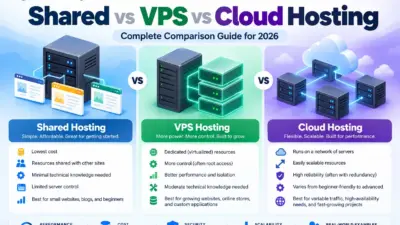
An easy way to picture the three main types:
- Shared hosting is a shared apartment. You split the cost and share the space.
- VPS hosting is your own flat in a building. The building is shared, but your space is yours.
- Cloud hosting is a network of connected buildings. If one has a problem, your site can move to another.
What Is Shared Hosting?
With shared hosting, many websites use the same server and its resources (CPU, RAM, and storage). The hosting company manages the server for you.
Pros
- Lowest price of the three
- Beginner-friendly, usually with a control panel like cPanel
- The host handles updates and server maintenance
Cons
- Other websites can slow yours down if they use too many resources (often called the “noisy neighbor” problem)
- Limited control over server settings
- Strict resource limits, so busy sites can hit caps
- A problem on the server can affect many sites at once
Best for: personal blogs, portfolio sites, small business “brochure” websites, and new projects testing an idea.
What Is VPS Hosting?
VPS stands for Virtual Private Server. One physical server is split into several virtual servers, and each VPS gets its own reserved share of CPU, RAM, and storage.
Your resources are not shared with other customers, so performance is steadier than on shared hosting.
Pros
- More consistent speed than shared hosting
- Dedicated resources
- More control, often including root access
- Easy to upgrade to a bigger plan
Cons
- Costs more than shared hosting
- Resources are fixed, so a big traffic spike can still slow your site
- Unmanaged VPS means you handle setup, security, and updates yourself
Managed vs unmanaged VPS: With managed VPS, the host takes care of server setup, updates, and security. With unmanaged VPS, that is all your job. If you are not technical, choose managed.
Best for: growing businesses, WooCommerce and other online stores, membership sites, and sites that have outgrown shared hosting.
What Is Cloud Hosting?
With cloud hosting, your website runs on a network of connected servers instead of a single machine. If one server fails, others can take over. You can also add or remove resources quickly, often in minutes.
Pros
- Resources scale up or down easily
- Better protection against hardware failure than a single server
- Handles traffic spikes well when set up properly
- Many providers offer pay-as-you-go pricing
Cons
- Pay-as-you-go bills can be hard to predict
- Can be more complex to set up than shared hosting
- Usually costs more than shared hosting
A note on names: “Cloud hosting” is not used the same way by every company. Some “cloud” plans are fully scalable setups. Others are simply VPS plans running on cloud servers. Before you buy, check whether the plan can scale resources automatically or on demand, and whether it includes a backup and failover setup.
Best for: busy online stores, SaaS apps, media sites, and any website with changing or unpredictable traffic.
Shared Hosting vs VPS vs Cloud Hosting: Comparison Table
| Shared Hosting | VPS Hosting | Cloud Hosting | |
|---|---|---|---|
| Price | Lowest | Medium | Medium to high; can vary with usage |
| Resources | Shared with other sites | Dedicated to you (fixed) | Flexible and scalable |
| Performance | Can vary with neighbors | Steady | Strong, depends on setup |
| Handles traffic spikes | Poorly | Moderately | Best |
| Security isolation | Lowest | Higher | Higher |
| Control | Limited | High | High |
| Technical skill | None | Low (managed) to high (unmanaged) | Low to moderate |
| Best for | Small sites, beginners | Growing sites and stores | Large, busy, or fast-changing sites |
Actual speed, security, and uptime depend on the provider, the plan, and how your site is built, not only on the hosting type.
VPS vs Cloud Hosting: What Is the Difference?
- VPS: Your site runs on one physical server, split into virtual parts. Resources are fixed, and pricing is usually predictable.
- Cloud: Your site runs across multiple servers. Resources can grow or shrink, and billing may follow usage.
Choose VPS if you want predictable cost and stable performance. Choose cloud if your traffic changes a lot or you cannot afford downtime from a single server failing.
Is VPS Better Than Shared Hosting?
For performance, control, and isolation, yes. But “better” is not always “right.”
If your site is small and your traffic is low, shared hosting from a good provider is often enough, and you save money. Upgrade when you see the warning signs below, not before.
How to Choose the Right Hosting
Traffic numbers alone can mislead. A simple blog with 50,000 visitors can run fine on shared hosting if pages are cached. A small online store with 2,000 visitors may need more power because every visit runs database queries.
Instead, start with your type of website:
| Your situation | Recommended hosting |
|---|---|
| New blog, portfolio, or simple business site | Shared hosting |
| WordPress site with growing traffic | Good shared plan, or managed WordPress or managed VPS |
| Online store (WooCommerce, etc.) | Managed VPS or cloud |
| Membership site, course platform, or custom web app | VPS or cloud |
| Traffic spikes (sales, launches, viral content) | Cloud hosting |
| Large business site where downtime costs money | Cloud hosting |
| You are not technical but need more power | Managed VPS or managed cloud |
Then check these three things:
- Budget: include the renewal price, not just the first-year offer.
- Technical skill: if you do not want to manage a server, choose a managed plan.
- Growth plans: if you expect fast growth, pick a host that makes upgrading easy.
Does Hosting Affect SEO?
Hosting is not a Google ranking factor on its own, but it affects things that matter:
- Speed: A slow server increases the time before your page starts loading. Page experience and speed matter to both users and Google.
- Uptime: If your site is down when Google tries to crawl it, pages may be crawled less often. Long outages can hurt visibility.
- Security: A hacked site can be flagged as unsafe and lose traffic.
- Server location: A server closer to your visitors can reduce loading time. A CDN can also help.
Good hosting will not rank a weak site, but poor hosting can hold back a good one.
When Should You Upgrade?
Consider moving up if:
- Your site is slow even after caching and image optimization
- You see “resource limit reached” or “508” or “503” errors
- Your site goes down during busy hours
- Your host warns you about high resource usage
- You are starting to sell products online
- Traffic or orders are growing steadily
Typical path: shared → VPS → cloud (or a larger cloud plan). Before upgrading, try a caching plugin, image compression, and a CDN. These fixes are cheaper and sometimes enough.
Common Mistakes to Avoid
- Choosing only on price. Very cheap plans often come with weak support or strict limits.
- Ignoring renewal prices. The first-year price may be much lower than the renewal price.
- Skipping backups. Check whether backups are included, how often they run, and how to restore them.
- Buying unmanaged VPS without technical skills. You become responsible for security and updates.
- Upgrading too early. Pay for what you need now, and scale later.
- Not testing support. Ask a pre-sales question and see how quickly and clearly they reply.
Frequently Asked Questions
Which hosting is best for a small business?
- For most new small business websites, shared hosting is enough. When you start selling online or traffic grows, move to VPS or a managed plan.
Is cloud hosting better than VPS?
- Not always. Cloud is better for flexibility and handling spikes. VPS is often simpler and more predictable in cost. Pick based on your traffic pattern and budget.
Is shared hosting good enough for a business website?
- Yes, for a small, low-traffic business site. For online stores or sites where downtime costs you money, VPS or cloud is safer.
Is VPS hosting hard to use?
- Unmanaged VPS can be, because you handle the server yourself. Managed VPS is much easier, since the host handles the technical work.
Which type of hosting is the fastest?
- There is no fixed answer. Speed depends on the provider, server hardware, location, and your website setup. VPS and cloud usually perform more consistently than shared hosting.
Which hosting is the most secure?
- VPS and cloud offer better isolation than shared hosting. But security also depends on updates, passwords, plugins, and your provider’s protections.
Can I upgrade from shared hosting to VPS later?
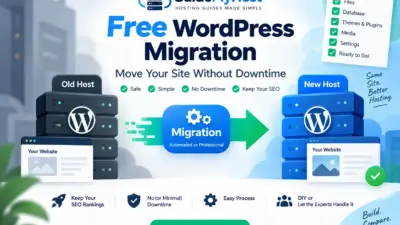
- Yes. Most hosts offer upgrade paths, and many provide free or paid migration help. Ask before you buy.
What about dedicated hosting?
- Dedicated hosting gives you a whole physical server to yourself. It costs more and is mainly for very large or high-security sites. Most small businesses will never need it.
Final Verdict
| If you are… | Choose |
|---|---|
| Starting a blog or small website | Shared hosting |
| Running a growing business or online store | VPS hosting (managed if you are not technical) |
| Expecting traffic spikes or needing maximum flexibility | Cloud hosting |
There is no single best option for everyone. Start with what fits your site today, choose a provider with good support and backups, and upgrade when your site needs more.
Facing any issues or have questions? Contact us at GuideMyHost — we’re here to help!